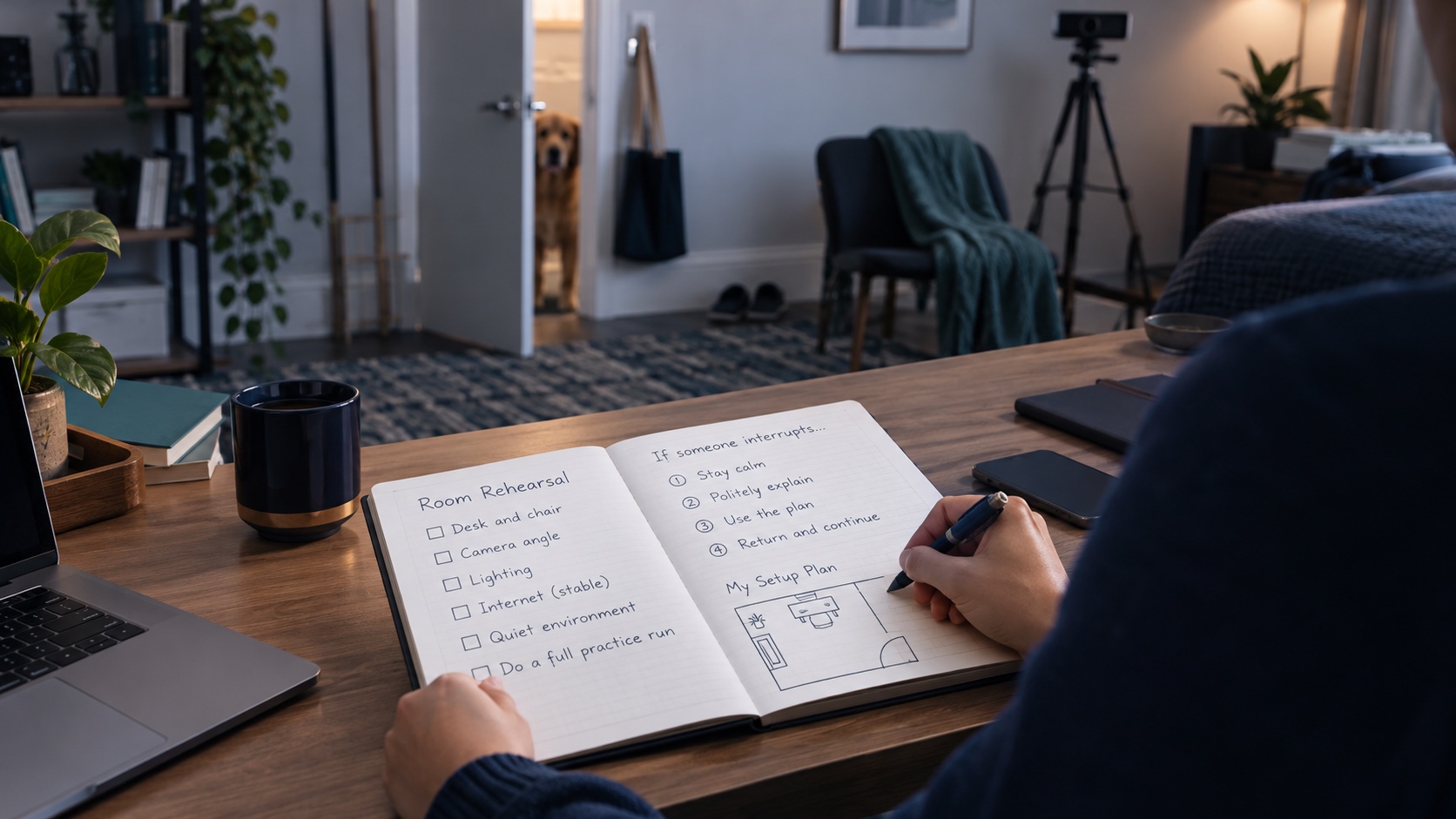
Planning your Duolingo English Test room and equipment check means preparing the physical space as carefully as the computer. A quiet room, a stable setup and an understanding of the current instructions can reduce avoidable disruption. The aim is to discover problems before you begin, while leaving the final decisions about acceptable conditions to the official test requirements and check-in process.
This guide offers a practical rehearsal method for someone considering the DET at home. It explains how to inspect the room, organise equipment, involve other household members and prepare a sensible contingency. It does not certify a room as compliant or guarantee that a test will be certified. Check the provider's current requirements for your own equipment and circumstances before purchasing or starting the test.
Begin with the official setup instructions
Duolingo's current setup guidance describes a computer with the required camera, microphone and speakers, the desktop app, and a smartphone used as a secondary camera. It also describes room and ear scans during setup. Read the complete current guidance before arranging your space; an older video showing a different process may no longer be a reliable checklist.
The provider's instructions remain the authority for what is allowed. This article focuses on preparing and rehearsing the arrangement, rather than reproducing every rule. Keep the official page easy to find so that you can recheck a detail instead of relying on memory or a comment in a study group.
Our Duolingo English Test overview explains the broader planning questions, including confirming acceptance with your intended institution. Room preparation should follow that decision. Having convenient equipment at home does not establish that the test meets every application's requirements.
Choose the room before choosing the hour
Walk through the rooms you could realistically use and consider how each behaves during the proposed test period. A room that is quiet late at night may be busy during the afternoon. A desk near a hallway may experience interruptions that you do not notice during ordinary browsing. Observe the space at the time you expect to use it.
Consider privacy, lighting, access by others and the ability to arrange the required equipment. A shared living area may be difficult to keep undisturbed even when other people intend to help. Do not rely on a promise that everyone will “try to be quiet” if people must pass through the space for everyday activities.
Check the room against the official requirement to be alone in an appropriate private setting. If you cannot create suitable conditions, resolve that problem before treating a date as fixed. Moving to another room or choosing a different time may be more practical than buying equipment to compensate for an unsuitable space.
Write down the main constraint for each candidate room. This makes your choice concrete: one has better privacy but poor evening light; another has better connectivity but frequent access by family members. Address the limiting condition rather than choosing solely on appearance.
Make a household interruption plan
Tell the people who share your home when you need the room and why interruptions matter. Include setup time and a reasonable buffer in that conversation, without presenting your personal estimate as an official test duration. The provider's current instructions should guide the actual time you need to reserve.
Agree who will handle visitors, deliveries or ordinary household questions during that period. If someone normally needs an item from the room, move it beforehand. A note on the door can support the agreement, but it cannot replace a conversation with the people most likely to enter.
Think about pets and routine noise as practical planning issues. Arrange care or access outside the room where necessary. Do not assume that a familiar sound will be irrelevant simply because you are used to it. The goal is a stable environment that fits the official conditions, not a test of how much distraction you can tolerate.
If you cannot control an expected interruption, change the plan while you still have time. A rehearsal is valuable precisely because it can reveal that the chosen hour is unsuitable. Treat that discovery as useful preparation rather than a failure.
Check the computer as a complete setup
Confirm that your computer meets the current official requirements, including supported software and the necessary peripherals. Do not judge compatibility only by whether a browser opens normally. A desktop testing application can have requirements that ordinary browsing does not reveal.
Use the official installation and equipment-check process. Follow its instructions and resolve any reported issue through the provider's guidance. Avoid downloading a testing application from an unofficial link or installing a “fix” supplied by an unknown person. If you need technical assistance, describe the actual error and your setup through an appropriate support route.
Inspect power and cable arrangements before the rehearsal. Position the computer so that you can sit comfortably while keeping the required views possible. A cable stretched across the floor or a power connection that disconnects easily is an avoidable source of disruption.
Do not make significant software or equipment changes immediately before a planned attempt without checking the setup again. A new headset, monitor arrangement or software setting may alter the environment you previously tested. Use the current rules to determine what equipment is permitted rather than assuming that a familiar accessory is acceptable.
Plan the secondary camera position deliberately
Duolingo's setup guidance explains that the phone camera should show the required view of the computer and keyboard from the side. The phone needs a stable position, and its power and connection should be prepared. Follow the exact on-screen instructions for the view; a position that looks convenient to you may not show what the test requires.
During your rehearsal, examine whether the phone can remain upright without being held or balanced precariously. Check whether a charging cable pulls it away from its position. Make the arrangement stable before you begin rather than assuming you can keep adjusting it during the test.
Consider the space around your hands and chair. Ordinary movement should not easily knock the phone or its support. This is a practical observation about stability, not permission to improvise around a required camera angle. If the required view is difficult to achieve, adjust the desk arrangement in advance and consult official guidance when necessary.
The provider instructs candidates not to touch the phone after positioning it for the test. Prepare with that restriction in mind. Anything you routinely use the phone for, such as checking the time or receiving a message, needs to be addressed before the attempt under the applicable rules.
Inspect lighting from the cameras' point of view
A room can look bright to you while a camera struggles with shadows or a strong light behind your head. During the equipment check, inspect the image the application shows rather than relying only on how the room feels. Adjust permitted lighting so that the required view is clear and stable.
Test at the intended time of day when possible. Daylight changes, and a position that works in the morning may become difficult as the sun moves. If you rely on artificial lighting, check that it can remain on throughout the period and does not interfere with the equipment arrangement.
Avoid creating a complex setup that needs frequent adjustment. A lamp balanced near the phone or a curtain that repeatedly blows across the view adds another possible interruption. Simpler arrangements are easier to rehearse and maintain, provided they satisfy the actual requirements.
If the official equipment check reports a problem, treat that result as unresolved until you have followed the relevant instructions and checked again. A personally reassuring view in another app does not automatically override the testing application's feedback.
Clear the desk with purpose
Review the official rules for permitted items and remove things that do not belong in the test space. This is easier when you do it systematically: inspect the desk surface, nearby shelves within the setup area and objects that you normally reach for while working. Follow the provider's instructions rather than inventing your own interpretation of what “probably does not matter.”
Move notebooks, study prompts and unrelated devices out of the way before the final check. Keep necessary identity material available as instructed during setup, then follow the on-screen directions about its placement. Do not assume that something used during check-in remains permitted in the same position throughout the test.
Avoid using a rehearsal as an opportunity to memorise ways to keep unapproved help nearby. The purpose is to create a compliant environment where you can work independently. If an item is important for accessibility or another legitimate need, investigate the official process in advance rather than quietly adapting the room around an assumption.
Photographs of your room may be useful for your private planning, but they do not constitute provider approval. An arrangement that appears tidy in a photograph still needs to satisfy the current instructions and live setup checks.
Run a rehearsal without starting an unwanted attempt
Use the provider's available setup guidance and checks to rehearse the arrangement. Be careful to distinguish a permitted equipment check or practice activity from starting an actual test attempt. Read the screen before proceeding and do not click through an unfamiliar step merely to see what happens.
Write a short sequence for yourself: prepare the room, arrange the computer and phone, check power and connectivity, confirm privacy, and follow the official setup process. This personal sequence is a reminder to complete checks, not a replacement for the provider's order of instructions.
During the rehearsal, record practical issues in plain language. “Phone support moves when charging cable is connected” is more useful than “camera problem.” “Household member needs cupboard access at this hour” identifies a planning issue that no computer setting can solve.
Repeat only the affected checks after fixing a problem, then confirm that the complete arrangement still works together. A local adjustment can affect something else: moving the desk may improve the camera view while weakening the connection or blocking a doorway.
Worked example: a desk that seems ready but is not
Imagine a candidate who plans to use a bedroom desk in the evening. The computer works normally, and the room is usually quiet. During rehearsal, the candidate discovers that the phone's charging cable is too short for a stable side position and that the only lamp creates a shadow in the camera image.
The candidate first changes the desk arrangement so the phone can remain stable while connected to power. Next, the lighting is adjusted and checked using the appropriate setup view. Neither change is treated as automatically sufficient; the candidate repeats the relevant official checks.
A conversation with the household reveals a third issue: another person normally enters the room to collect work materials during that hour. Those materials are moved before the planned session, and a clear agreement is made about access. The solution includes equipment and household planning because both affected the same attempt.
This example does not imply that every similar room will be accepted. It illustrates a method: identify an observable problem, make a suitable change, and verify the result under the current instructions. The candidate finishes with fewer unresolved assumptions rather than a promise that nothing can go wrong.
Prepare a contingency for unresolved problems
Decide in advance what you will do if a required check fails. That may mean pausing preparation, consulting official support or changing the room before starting. Do not treat a planned date as a reason to bypass a requirement you have not met.
If a technical issue occurs during an actual attempt, follow the on-screen and official support instructions for that situation. This article cannot specify a universal recovery action because the appropriate response depends on the problem and the current process. Record relevant non-sensitive details afterwards if support asks for them.
Keep your application deadline visible when making the broader plan. A last-minute setup leaves little room to investigate equipment problems. Build in time for checking the environment without presenting any particular buffer as a guarantee of results or certification.
Before purchasing an offer, review the terms to confirm before buying. Delivery, validity and refund conditions should be understood separately from equipment readiness. A room rehearsal does not establish the terms of a transaction, and an order receipt does not establish that the room is suitable.
Finish with a short readiness record
Your final preparation record can be brief: the official guidance checked, the intended room and time, the equipment arrangement tested, and any issue still unresolved. Keep it private and avoid including passwords or unnecessary identity details. Update it if you change the computer, phone, room or planned time.
Use the exam resources page for broader planning references, and return to the official DET setup guidance for the actual conditions. Separate remembered advice from current requirements whenever they differ. The closer you get to the attempt, the more important it becomes to verify the arrangement you will really use.
A well-prepared DET space is the result of practical checks: privacy that can be maintained, equipment that meets current requirements, stable camera positioning and a household plan that supports uninterrupted testing. Complete those checks early, resolve what you can and use official support for uncertainties. That gives you a clearer basis for proceeding without confusing preparation with a guarantee of acceptance or certification.
Official references
Duolingo English Test setup, secondary camera and room scans
Official Duolingo English Test website
About this guidance
This article offers independent planning and practice guidance. Official references are linked in the text. References last checked: 2026-10-13. Provider requirements and receiving institutions’ policies take priority; check the current instructions before booking or acting.